最新消息與更多產品資訊,請上OWC Asia中文版新網站www.owcasia.com.tw

如何更換Mac OS內顯示外接裝置的小圖示

1. 下載您要更換的外接裝置小圖示,下載完成後,解壓縮,將 *.icns 檔案存放在桌面上。

2. 選擇要更換的外接裝置,按下「command」+「I」或是選擇工具列「File」項目內的「Get Info」。
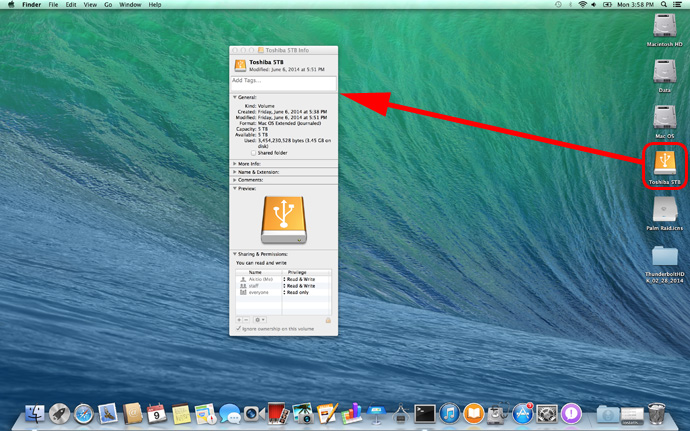
change-icons-01

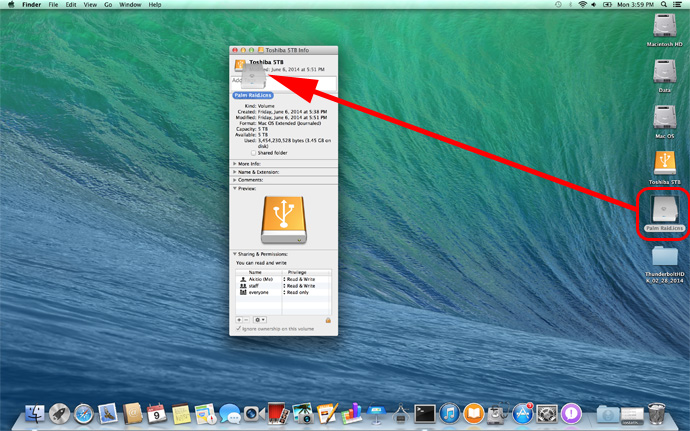
 2. 將 *.icns 檔案直接拖曳到訊息視窗左上方的檔位置,完成更換。
change-icons-02


附件
檔案說明檔案大小最後修改
aDrive U3aDrive U3 - icns 小圖示86.1 KB2015-03-27
Neutrino Thunder D3迷你雷霆金牛座 D3 - icns 小圖示106.2 KB2015-03-27
Neutrino Thunder Duo迷你雷霆金牛座 - icns 小圖示122.6 KB2015-03-27
Neutrino U3冰極光 U3 - icns 小圖示101.0 KB2015-03-27
NT2 U3.1鐵甲武士 U3.1 - icns 小圖示1,017.6 KB2017-09-22
Palm Raid雷霆掌心龍 - icns 小圖示87.0 KB2015-03-27
SK-3501 U3星極光 U3 - icns 小圖示1.1 MB2017-09-22
SK2520 U3.1迷你金牛 U3.1975.4 KB2017-09-22
Thunder 2 Quad雷霆戰艦 - icns 小圖示103.8 KB2015-03-27
Thunder2 Duo Pro雷霆雙劍2 - icons 小圖示2.0 MB2016-08-16
Thunder2 Quad Mini迷你雷霆戰艦 - icns 小圖示1.6 MB2017-05-24
Thunder3 Duo Pro雷霆雙劍3 - icons 小圖示1.1 MB2016-08-16
Thunder3 Quad Mini迷你雷霆戰艦3 - icns 小圖示957.5 KB2017-09-22
Thunder3 Quad X雷霆戰艦 3X - icns 小圖示801.1 KB2017-09-22
Thunder3 Raid Station雷霆雙劍3 Pro - icons 小圖示1,008.2 KB2018-03-12
Thunderbolt Edition雷霆冰極光 - icns 小圖示62.3 KB2015-03-27
ThunderGo雷霆行動碟 - icns 小圖示81.2 KB2015-03-27